

ClickUp is one of the most powerful all-in-one project management platforms available in 2026. With advanced customization, built-in automation, and competitive pricing, it’s ideal for teams that want flexibility and scalability.
Modern workplaces require more than just a simple to-do list to stay on track. Keeping up with fast-paced changes is a major challenge for growing businesses today.
A powerful productivity tool can transform how your office functions. It helps teams organize their daily tasks while maintaining a clear vision of the bigger picture.
This ClickUp analysis shows why many professionals prefer it for complex workflows. It serves as a comprehensive hub where every detail of a campaign stays neatly organized.
Streamlining your project management efforts allows you to save time and reduce stress. This platform provides the flexibility needed to handle any size of task or team.
Strong team collaboration is the backbone of any successful organization. By using the right software, you ensure that every member knows exactly what they need to do next.
Key Takeaways
- Centralized dashboard for all work processes.
- Enhanced visibility for every team member.
- Customizable task management features for better flow.
- Improved efficiency for managing complex projects.
- Seamless communication within a single platform.
- Real-time updates on daily project status.
What Is ClickUp?
In the realm of project management, ClickUp stands out as a comprehensive solution that integrates various features into one platform. This all-in-one work management tool is designed to simplify task organization, enhance team collaboration, and boost productivity.
Overview of the Platform
ClickUp is a multifaceted platform that offers a wide range of tools and features to support project management. From task assignment and tracking to time management and reporting, ClickUp provides a holistic approach to managing projects. The platform is highly customizable, allowing teams to tailor it to their specific needs and workflows.
Key features of ClickUp include:
- Task management and organization
- Collaboration and communication tools
- Automation and workflow customization
- Time tracking and reporting

Company Background
ClickUp was founded with the mission of providing a comprehensive project management solution that simplifies work processes. The company has rapidly grown, driven by its innovative approach and commitment to customer satisfaction. With a strong focus on continuous improvement, ClickUp regularly updates its platform with new features and enhancements.
Core Value Proposition
At its core, ClickUp’s value proposition lies in its ability to unify various project management functions into a single, intuitive platform. By offering an all-in-one solution, ClickUp eliminates the need for multiple, disparate tools, thereby streamlining workflows and enhancing productivity. The platform’s flexibility and customization options further enhance its appeal, making it suitable for a wide range of teams and industries.
The core benefits of using ClickUp include:
- Enhanced productivity through streamlined workflows
- Improved collaboration and communication
- Customizable to meet specific team needs
ClickUp Review: Our Overall Assessment
ClickUp has been put to the test, and here’s our honest assessment of its strengths and weaknesses. After using ClickUp extensively, we’ve compiled a comprehensive overview that highlights its overall rating, key strengths, main limitations, and best use cases.
Overall Rating
Our overall rating for ClickUp is based on its feature set, usability, and value proposition. ClickUp scores high on customization and flexibility, making it a versatile tool for various teams and projects.
ClickUp’s overall rating is 4.5 out of 5 stars. This rating is derived from its robust feature set, user-friendly interface, and excellent customization options.
Key Strengths at a Glance
ClickUp’s key strengths include:
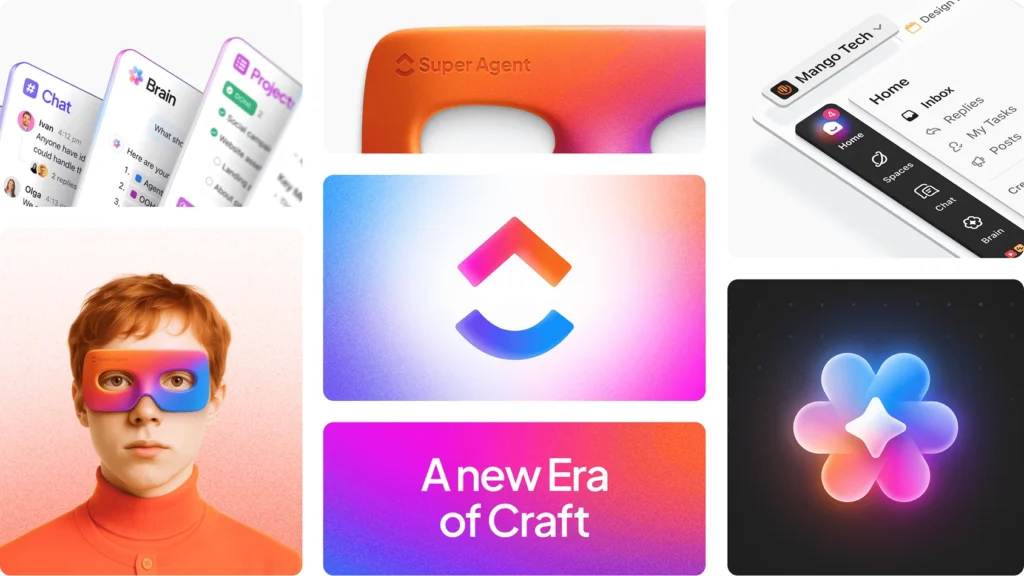
- All-in-one workspace: Combines tasks, docs, goals, and chat in one platform.
- Highly customizable: Offers extensive customization options to fit various workflows.
- User-friendly interface: Intuitive design makes it easy to navigate and use.
- Robust integrations: Seamlessly integrates with numerous third-party apps.
Main Limitations
Despite its many strengths, ClickUp has some limitations:
- Steep learning curve: The extensive feature set can be overwhelming for new users.
- Performance issues with large datasets: Some users report slowdowns when handling large projects.
- Limited offline access: While there’s a mobile app, offline capabilities are somewhat restricted.
Best Use Cases
ClickUp is ideal for:
- Small to medium-sized businesses: Offers a comprehensive solution for managing projects and teams.
- Remote and hybrid teams: Facilitates collaboration and communication across different locations.
- Agencies and creative teams: Provides tools tailored to their specific needs, such as task management and time tracking.
By understanding ClickUp’s overall assessment, potential users can make an informed decision about whether it suits their needs.
Key Features of ClickUp
With ClickUp, users can leverage a powerful set of tools to manage tasks, collaborate effectively, and automate workflows. This versatility makes it an attractive solution for teams looking to streamline their project management processes.
Task Management and Organization
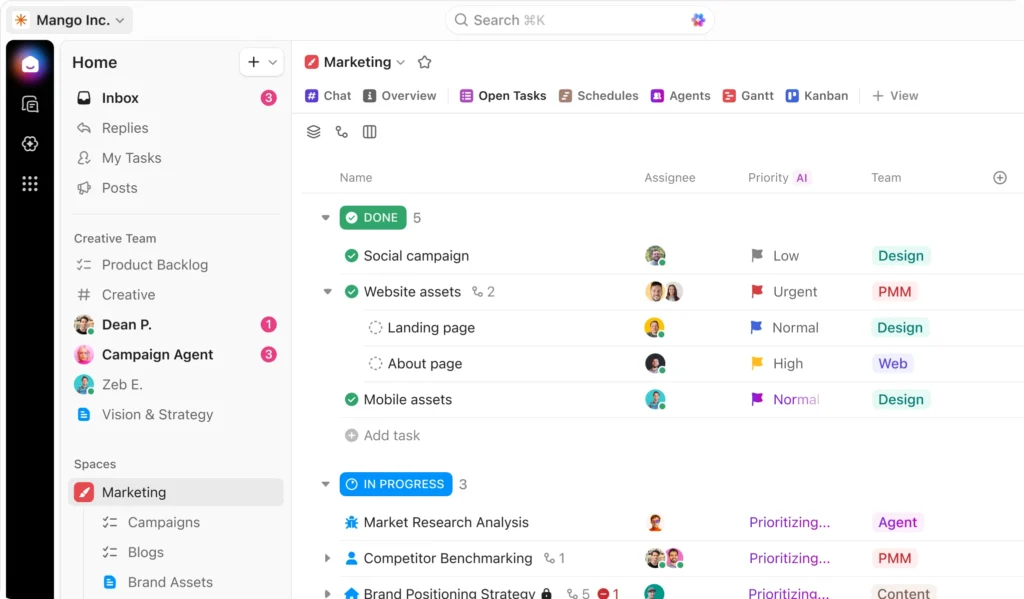
ClickUp excels in task management, offering multiple ways to organize and prioritize work. Efficient task management is crucial for productivity.
Multiple View Options
Users can switch between various views such as List, Board, Calendar, and Gantt to visualize their tasks and projects in the most suitable format.
Custom Fields and Statuses
The ability to create custom fields and statuses allows teams to tailor ClickUp to their specific needs, enhancing flexibility and adaptability.
Task Dependencies and Relationships
ClickUp enables users to establish task dependencies, ensuring that workflows are logically connected and that teams can manage complex projects effectively.
Collaboration and Communication
Effective collaboration is at the heart of ClickUp’s design. The platform offers several features to facilitate seamless communication among team members.
Real-Time Editing and Comments
ClickUp allows for real-time editing and commenting on tasks and documents, ensuring that all team members are on the same page.
Document Management
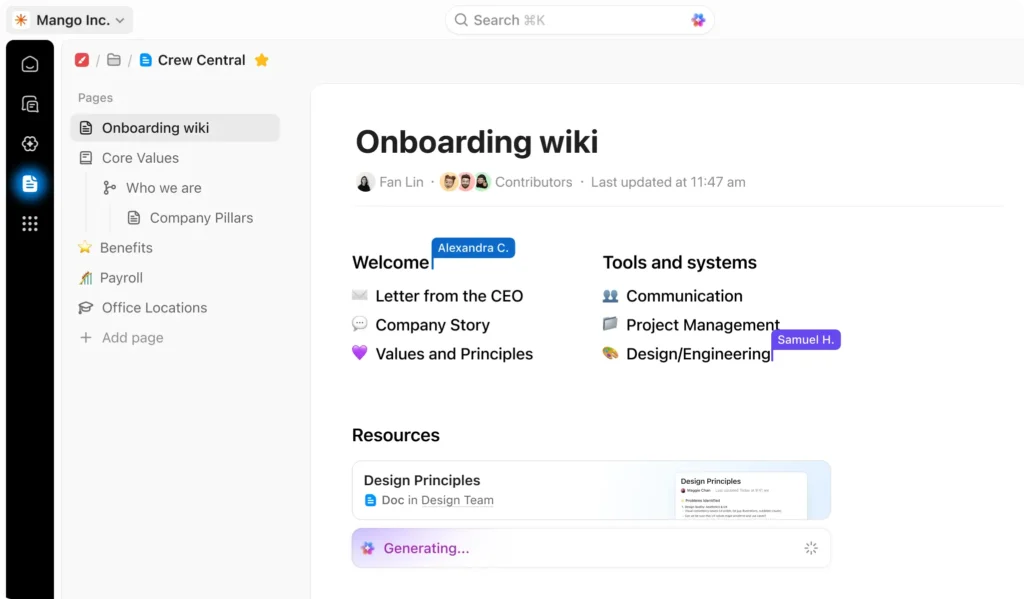
The platform provides robust document management capabilities, making it easy to store, share, and collaborate on documents.
Team Chat Features
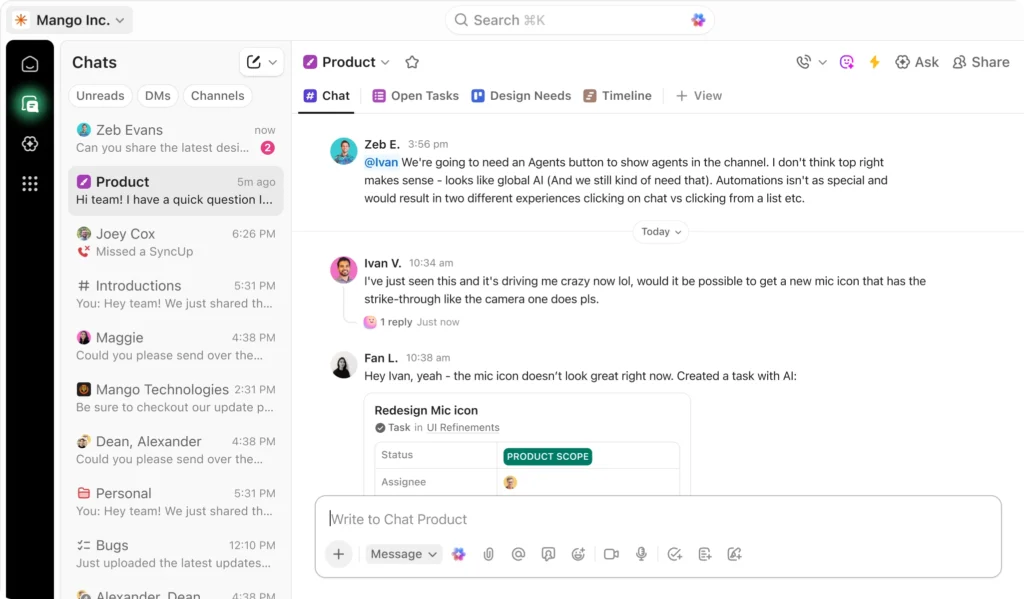
With integrated team chat features, ClickUp helps reduce email clutter and keeps conversations organized within the context of tasks and projects.
Automation and Workflows
Automation is a key feature that sets ClickUp apart, enabling users to streamline repetitive tasks and focus on high-value work.
Custom Automations
Users can create custom automations based on specific triggers and actions, tailoring the automation to their unique workflows.
Templates and Recurring Tasks
ClickUp offers templates and the ability to set up recurring tasks, further simplifying the management of regular and repetitive tasks.
Time Tracking and Reporting
Understanding how time is spent is crucial for project management. ClickUp provides comprehensive time tracking and reporting features.
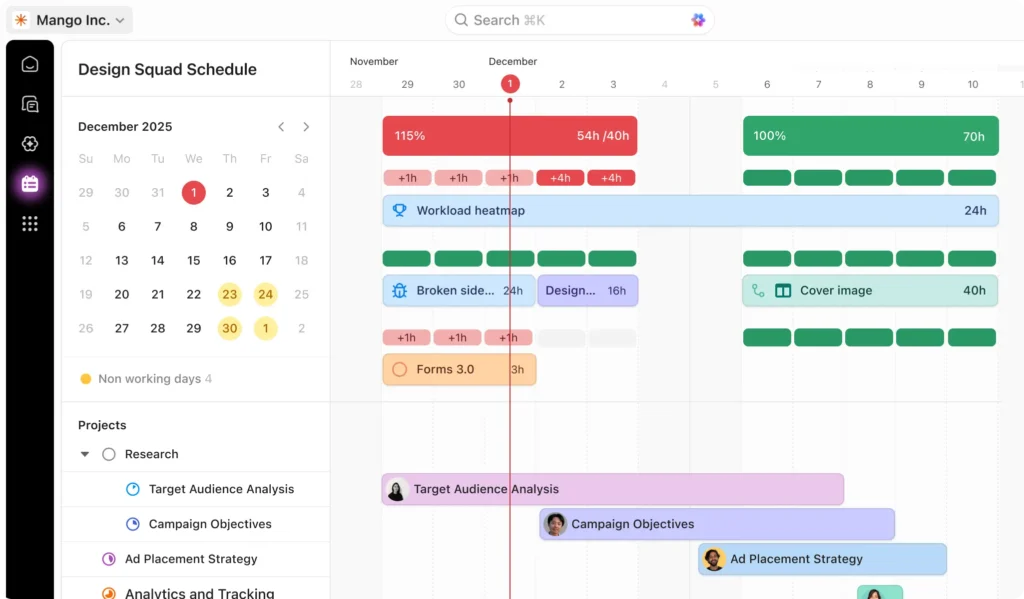
Native Time Tracking
The platform includes native time tracking, allowing users to log time directly within ClickUp without needing third-party integrations.
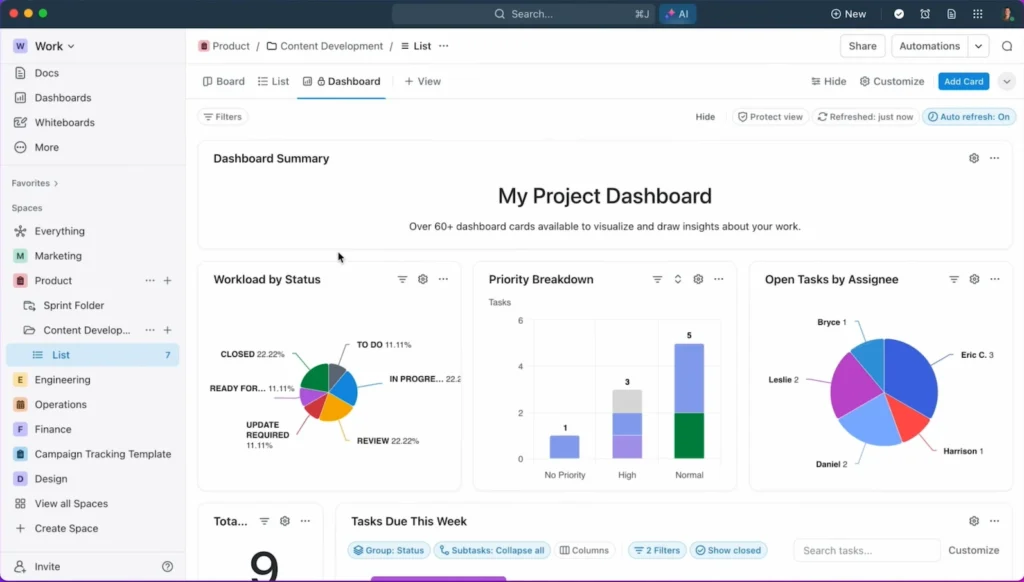
Dashboard and Analytics
ClickUp’s dashboards and analytics provide insights into project performance, helping teams make informed decisions.
As emphasized by a ClickUp user, “ClickUp has revolutionized the way we manage projects. Its comprehensive features have significantly improved our team’s productivity and collaboration.”
“The all-in-one functionality of ClickUp has been a game-changer for our workflow, allowing us to manage tasks, track time, and collaborate seamlessly.”
ClickUp Pricing Plans
The pricing plans of ClickUp are structured to provide flexibility and scalability for its diverse user base. Whether you’re an individual, a small team, or a large enterprise, ClickUp has a plan that can meet your needs.
To better understand the differences between the plans, here’s a comparison table:
Free Forever
$0
Perfect for individuals.
Unlimited
$5/User/mo
Ideal for small teams.
Business
$12/User/mo
Great for growing businesses.
Enterprise
$Custom
Great for growing businesses.
Pros of Using ClickUp
The advantages of using ClickUp are multifaceted, making it a preferred choice for many teams. ClickUp’s flexibility and comprehensive feature set cater to a wide range of business needs, from task management to team collaboration.
Exceptional Customization
ClickUp offers exceptional customization options, allowing users to tailor the platform to their specific needs. With customizable dashboards, workflows, and fields, teams can create a personalized experience that aligns with their workflow.
Comprehensive All-in-One Solution
As an all-in-one solution, ClickUp integrates various productivity tools into a single platform. This includes task management, time tracking, and team collaboration features, making it a one-stop-shop for businesses looking to streamline their operations.
Generous Free Tier
ClickUp’s generous free tier makes it accessible to teams of all sizes. The free plan includes a robust set of features, allowing businesses to get started without incurring significant costs.
Frequent Feature Updates
The ClickUp team is committed to continuous improvement, releasing frequent feature updates that enhance the user experience. This ensures that the platform stays relevant and competitive in the ever-evolving productivity tool landscape.
“ClickUp has been a game-changer for our team, allowing us to streamline our workflow and improve collaboration.” – Satisfied ClickUp User
Robust Mobile Application
ClickUp’s robust mobile application enables teams to stay productive on-the-go. With a seamless mobile experience, users can access tasks, projects, and team communications from anywhere.
Extensive Integration Options
The platform offers extensive integration options, allowing businesses to connect ClickUp with their existing tools and services. This flexibility ensures that ClickUp can be integrated into any workflow.
Cons of Using ClickUp
While ClickUp offers a wide range of features to boost productivity, it’s not without its drawbacks. As with any powerful tool, there are several cons that users should be aware of when considering ClickUp for their project management needs.
Steep Learning Curve for New Users
One of the primary drawbacks of ClickUp is its steep learning curve. New users often find it challenging to navigate the platform’s extensive feature set, which can lead to a significant investment of time in training and onboarding. This can be particularly daunting for teams with limited technical expertise or those transitioning from simpler project management tools.
Potential Feature Overload
ClickUp’s feature overload is another con that users may encounter. With so many features available, some users might find it difficult to focus on the tasks at hand, leading to decreased productivity. It’s essential for teams to identify their specific needs and configure ClickUp accordingly to avoid unnecessary complexity.
Performance Issues with Large Datasets
Some users have reported performance issues when dealing with large datasets within ClickUp. As the volume of data grows, the platform’s responsiveness can degrade, leading to slower load times and a less efficient user experience. This is particularly relevant for large teams or organizations with extensive project portfolios.
Limited Offline Access
ClickUp’s limited offline access is another limitation. While the platform offers mobile apps and some offline capabilities, certain features are not fully accessible without an internet connection. This can be a significant drawback for teams that require uninterrupted access to their project management tools, especially in areas with unreliable internet connectivity.
Customer Support Response Times
Finally, some users have noted that ClickUp’s customer support response times can be slow, particularly during peak periods or for complex issues. While the platform offers extensive documentation and community resources, timely support is crucial for resolving critical issues and ensuring minimal downtime.
ClickUp User Interface and Experience
ClickUp’s user interface is designed to provide a seamless experience across various devices and platforms. The platform’s intuitive design allows users to navigate and utilize its features with ease.
Dashboard and Navigation
The dashboard is the central hub of ClickUp’s UI, providing users with an overview of their tasks, projects, and notifications. Customization options are available to tailor the dashboard to individual preferences.
Main Interface Design
ClickUp’s main interface is clean and minimalistic, reducing clutter and enhancing usability. The design focuses on functionality, making it easier for users to access the tools they need.
“The interface is very user-friendly and easy to navigate,” as noted by users who appreciate the simplicity and effectiveness of ClickUp’s design.
Customization Capabilities
Users can customize their dashboard with various widgets, layouts, and views to suit their workflow. This flexibility is a significant advantage, as it allows teams to adapt the platform to their specific needs.
Desktop Experience
On the desktop, ClickUp offers a robust and feature-rich experience. The web application is optimized for performance, ensuring that users can work efficiently.
Web Application Performance
ClickUp’s web application is designed to be fast and responsive, handling large datasets and complex tasks with ease. This performance is crucial for teams that rely on the platform for their daily operations.
Desktop App Features
The desktop app provides additional features, such as offline access and native integrations, enhancing the overall user experience. These features make it an essential tool for teams working on critical projects.
Mobile App Experience
ClickUp’s mobile app is designed to provide a seamless experience on-the-go. The app is available for both iOS and Android devices.
iOS and Android Apps
The mobile apps offer a range of features, including task management, notifications, and collaboration tools. Users can access their projects and tasks from anywhere, at any time.
Mobile-Specific Features
The mobile app includes features like push notifications and mobile-specific task management, ensuring that users stay connected and productive while away from their desks.
ClickUp Integrations and Compatibility
With its robust integration capabilities, ClickUp seamlessly fits into diverse workflows, enhancing productivity across different teams and projects. This flexibility is crucial for businesses that rely on multiple tools and platforms to manage their operations.
Native Integrations
ClickUp offers a wide range of native integrations that allow users to connect their favorite tools and apps directly to the platform. These integrations are designed to streamline workflows and improve productivity.
Popular Business Tools
ClickUp integrates with popular business tools such as Google Drive, Dropbox, and Microsoft Office, enabling users to access and manage their files directly within the ClickUp environment.
- Google Drive integration for seamless file access
- Dropbox integration for cloud storage
- Microsoft Office integration for document editing
Communication Platforms
Effective communication is key to successful project management. ClickUp integrates with communication platforms like Slack and Microsoft Teams, ensuring that team members stay connected and informed.
“The integration with Slack has been a game-changer for our team. It keeps everyone on the same page and reduces email clutter.”
Third-Party Integration Options
Beyond native integrations, ClickUp also offers third-party integration options to further extend its functionality.
Zapier Integration
ClickUp’s integration with Zapier opens up a world of possibilities, allowing users to connect with over 1,000 other apps and automate various tasks.
| App Category | Examples of Integrated Apps |
|---|---|
| Marketing Tools | Mailchimp, Facebook Lead Ads |
| Productivity Apps | Evernote, Google Calendar |
| Customer Support | Zendesk, Freshdesk |
API Access and Custom Integrations
For businesses with specific integration needs, ClickUp provides API access for custom integrations. This allows developers to create tailored solutions that meet the unique requirements of their organization.
Cross-Platform Compatibility
ClickUp is designed to be accessible across various platforms, ensuring that users can work seamlessly whether they’re on a desktop, tablet, or mobile device.
The platform’s cross-platform compatibility is a significant advantage for teams that work remotely or have members using different devices.
Who Should Use ClickUp?
ClickUp is a versatile tool that can be beneficial for various types of businesses and teams. Its flexibility and comprehensive features make it an attractive option for organizations looking to streamline their operations and enhance productivity.
Ideal for Small to Medium-Sized Businesses
ClickUp is particularly beneficial for small to medium-sized businesses. These businesses often have limited resources and require a tool that can handle multiple tasks without being overly complex or expensive. ClickUp’s customizable interface and scalable pricing plans make it an ideal solution.
Perfect for Remote and Hybrid Teams
The platform is also perfect for remote and hybrid teams. With features like real-time collaboration, time tracking, and communication tools, ClickUp helps teams stay connected and work efficiently, regardless of their location.
Great for Agencies and Creative Teams
Agencies and creative teams can also greatly benefit from using ClickUp. The platform’s customizable workflows and task management features allow these teams to manage multiple projects simultaneously and meet tight deadlines.
Suitable for Software Development Teams
ClickUp is suitable for software development teams as well. Its features, such as task automation and reporting, help development teams streamline their processes and improve overall efficiency.
Not the Best Fit For
While ClickUp is versatile, it may not be the best fit for very large enterprises with highly specialized needs or for individuals looking for a simple task management tool. In such cases, more specialized or lightweight solutions might be more appropriate.
| Business/Team Type | ClickUp Suitability | Key Benefits |
|---|---|---|
| Small to Medium-Sized Businesses | High | Customizable, Scalable Pricing |
| Remote and Hybrid Teams | High | Real-time Collaboration, Time Tracking |
| Agencies and Creative Teams | High | Customizable Workflows, Task Management |
| Software Development Teams | High | Task Automation, Reporting |
| Large Enterprises | Moderate | May require customization |
| Individuals seeking simple task management | Low | May be overly complex |
ClickUp vs. Competitors
In the crowded landscape of productivity software, ClickUp stands out, but how does it stack up against its main competitors? As businesses look for the ideal project management solution, comparing ClickUp to its key competitors can help identify the best fit.
ClickUp vs. Asana
The comparison between ClickUp and Asana is significant, as both are popular project management tools with a wide range of features.
Feature Comparison
Both ClickUp and Asana offer robust task management capabilities. However, ClickUp’s all-in-one approach includes features like time tracking and goal setting, which are not as comprehensive in Asana.
| Feature | ClickUp | Asana |
|---|---|---|
| Task Management | Advanced | Advanced |
| Time Tracking | Yes | Limited |
| Goal Setting | Yes | Limited |
Pricing Differences
ClickUp offers a more generous free plan compared to Asana, making it an attractive option for small teams or startups.
- ClickUp Free Plan: Unlimited tasks, up to 100 MB storage
- Asana Free Plan: Limited to 15 users, basic features
ClickUp vs. Monday.com
Monday.com is known for its customizable workflows and user-friendly interface, making it a strong competitor to ClickUp.
Usability Comparison
Both platforms offer high usability, but Monday.com’s visual interface may appeal more to teams that prefer a more graphical representation of their projects.
“Monday.com’s interface is highly visual and intuitive, making it easy for teams to adopt and use.”
Value for Money
ClickUp generally offers more features at a lower price point than Monday.com, especially for larger teams.
ClickUp vs. Trello
Trello is famous for its Kanban board approach to project management, which is also available in ClickUp.
Complexity vs. Simplicity
While Trello excels in simplicity, ClickUp offers more advanced features, making it suitable for complex projects.
ClickUp vs. Notion
Notion is an all-in-one workspace that combines project management, note-taking, and knowledge base features.
If you’re unsure which platform fits your workflow best, check our in-depth comparison:
ClickUp vs Notion: Which Tool Is Better for Teams and Productivity?
Project Management vs. Knowledge Base
ClickUp focuses more on project management, while Notion excels in creating a centralized knowledge base.
Key differences:
- ClickUp: Advanced project management features
- Notion: Comprehensive knowledge base and note-taking capabilities
Conclusion
After a thorough examination of ClickUp’s features, pricing, and overall performance, it’s clear that this tool offers a robust solution for teams seeking to enhance productivity and streamline workflows. The ClickUp summary highlights its exceptional customization capabilities, comprehensive all-in-one solution, and generous free tier as significant advantages.
While ClickUp presents some challenges, such as a steep learning curve and potential feature overload, its benefits make it a worthwhile consideration for small to medium-sized businesses, remote teams, and agencies. As a ClickUp conclusion, this tool is a viable option for those seeking a powerful productivity solution, provided they are willing to invest time in mastering its capabilities.
Ultimately, ClickUp’s value lies in its flexibility and adaptability to various team needs, making it a strong contender in the productivity tool market.
Frequently Asked Questions (FAQs)
Yes, the Free Forever Plan is remarkably robust compared to competitors like Trello or Asana. It offers unlimited tasks and unlimited free plan members, making it an excellent entry point for startups and individuals. However, it does cap storage at 100MB and limits the usage of advanced features like Gantt Charts and Mind Maps to a certain number of uses.
A: ClickUp is designed with Agile teams in mind. Through the use of Sprints, Burndown charts, and Burnup charts, software developers can manage product backlogs and release cycles efficiently. The platform also integrates directly with GitHub, GitLab, and Bitbucket to streamline the DevOps workflow.
While ClickUp is primarily a project management tool, its ClickUp Docs feature provides a powerful alternative to Notion for internal wikis and knowledge bases. Additionally, the Chat View allows for real-time team communication, which can reduce the reliance on Slack by keeping project-related conversations directly tied to the relevant tasks
The Everything View is a unique organizational feature that provides a bird’s-eye perspective of every task across your entire Workspace. Whether a task is buried in a specific Folder or List, this view allows managers to filter and sort all work in one place, ensuring total visibility and better resource management.
Yes, ClickUp features native time tracking that allows users to record time spent on tasks without leaving the platform. This data can be exported into Reporting Dashboards to calculate billable hours, making it a preferred choice for marketing agencies and consultants who need to provide transparent documentation to clients.
A: ClickUp maintains high-level security standards, including SOC 2 Type 2 compliance and AES-256 encryption for data at rest. For large organizations requiring Enterprise-grade security, the platform supports Single Sign-On (SSO) through providers like Okta, Microsoft Azure, and Google.