

In 2026, finding the right digital workspace is vital for your organization’s success. Modern teams need platforms that blend flexibility with raw power to keep up with fast-paced industry demands. Staying competitive requires a system that feels natural and intuitive for every department.
This project management tools comparison examines the two biggest names currently leading the professional market. It helps you decide which interface best suits your specific workflow and team size. Making an informed choice now will prevent costly transitions in the future.
Comparing clickup vs notion involves looking at more than just simple checklists or basic task boards. You must evaluate how each system handles complex databases and real-time collaboration. Selecting the right platform is absolutely critical for maintaining long-term productivity and team morale.
Key Takeaways
- Evaluate your team’s specific workflow requirements before committing.
- Consider the learning curve for new employees to ensure quick adoption.
- Analyze how well each tool integrates with your existing software stack.
- Focus on long-term scalability to support your business as it grows.
- Prioritize features that enhance real-time collaboration for remote workers.
- Compare the total cost of ownership against the value of provided features.
ClickUp Overview: Features and Capabilities
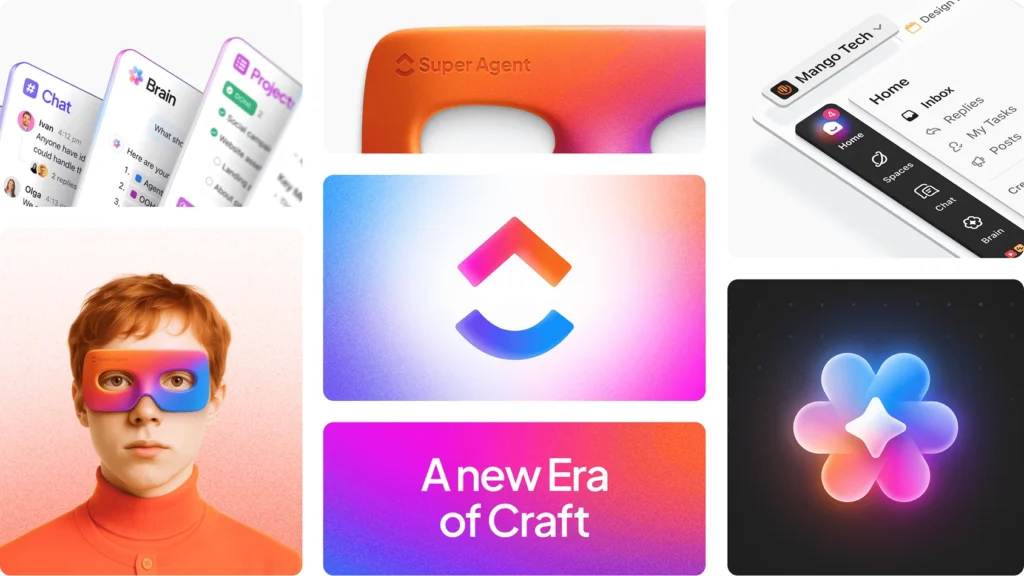
In the realm of project management tools, ClickUp stands out with its comprehensive set of features and capabilities. ClickUp is designed to cater to a wide range of project management needs, making it a versatile tool for various industries and team sizes.
What Makes ClickUp a Powerful Project Management Platform
ClickUp’s strength lies in its ability to integrate multiple project management features into a single platform. This includes task management, time tracking, and goal setting, among others. Key advantages include:
- Customizable workflows to suit different project requirements
- Real-time reporting and analytics for informed decision-making
- Seamless integrations with other productivity tools
Key Features and Functionality
Some of the key features of ClickUp include:
- Task management with prioritization and assignment capabilities
- Time tracking to monitor project progress and productivity
- Goal setting and tracking to align team efforts with organizational objectives
Target Users and Industries
ClickUp is designed to serve a broad spectrum of users, from small startups to large enterprises. It is particularly beneficial for teams that require a high degree of customization and flexibility in their project management tools.
Notion Overview: Features and Capabilities
As an all-in-one workspace, Notion provides a unique blend of note-taking, task management, and database capabilities. This versatility makes it an attractive option for users seeking a comprehensive productivity solution.
What Makes Notion an All-in-One Workspace
Notion’s strength lies in its ability to integrate multiple tools and features into a single platform. It offers a flexible and customizable environment that can be tailored to suit various user needs, from simple note-taking to complex project management.
Key benefits of Notion’s all-in-one approach include:
- Unified workspace for multiple tasks and projects
- Customizable templates and databases
- Seamless integration of notes, tasks, and databases
Key Features and Functionality
Notion’s feature set includes a range of tools for task management, note-taking, and database creation. Its drag-and-drop interface allows users to easily create and organize content, while its collaboration features enable real-time teamwork.
Some of Notion’s key features include:
- Drag-and-drop interface for easy content creation
- Customizable templates for various use cases
- Real-time collaboration and commenting

Target Users and Industries
Notion’s flexibility makes it suitable for a wide range of users and industries. From individuals and small teams to large enterprises, Notion can be adapted to meet diverse productivity needs.
Notion is particularly popular among:
- Remote teams and distributed workforces
- Creative professionals and content creators
- Students and researchers
ClickUp vs Notion: User Interface and Learning Curve
In the realm of project management tools, ClickUp and Notion stand out, but their user interfaces and learning curves differ significantly. The user interface is not just about aesthetics; it’s about how intuitively users can navigate and utilize the tool’s features. A steeper learning curve can hinder adoption, while an intuitive interface can enhance productivity.
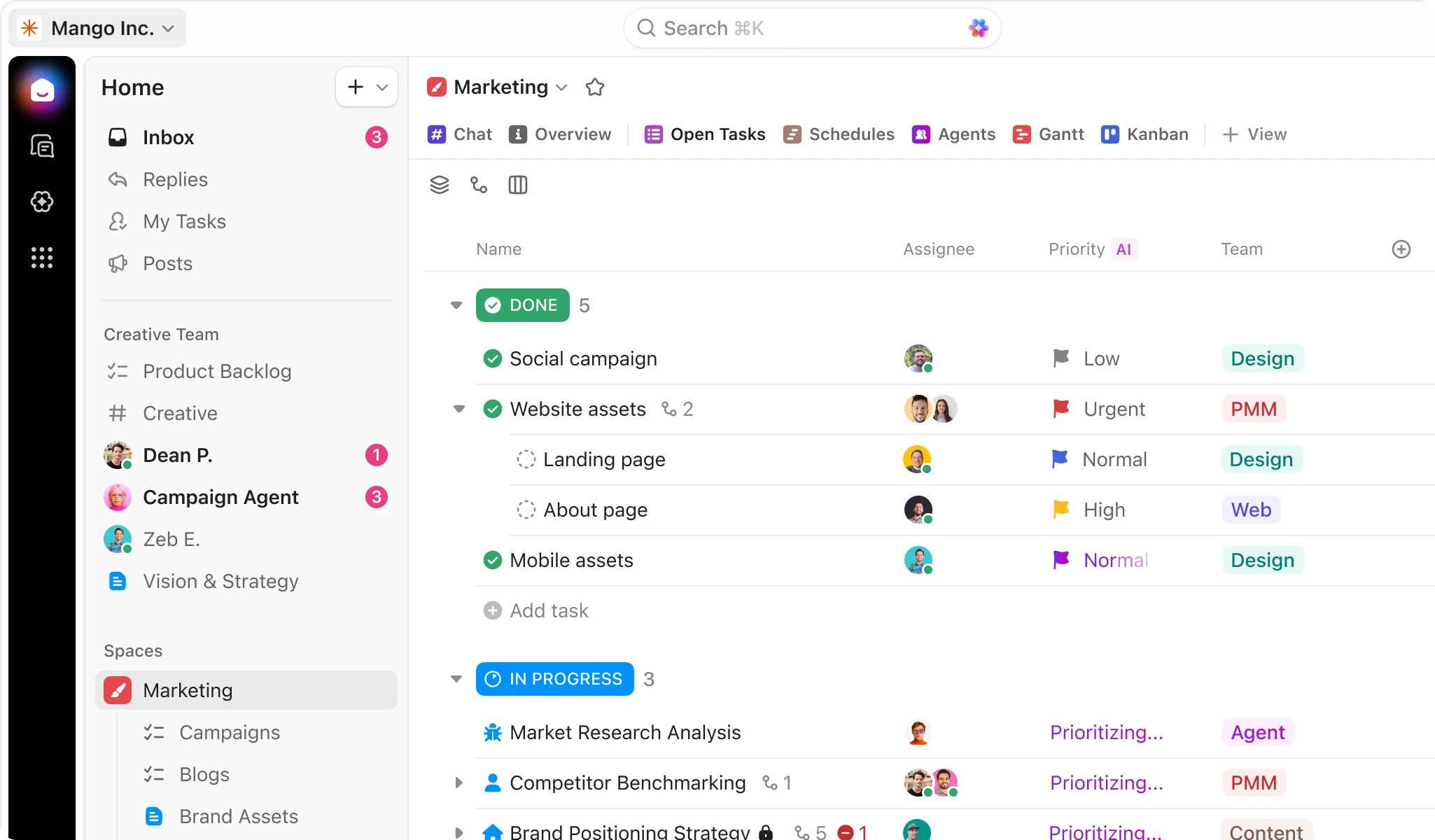
ClickUp’s Interface: Complexity vs Power
ClickUp is known for its feature-rich interface, which can be both a blessing and a curse. On one hand, it offers a wide range of functionalities that cater to diverse project management needs. On the other hand, this complexity can overwhelm new users. As Alex Yurkowski, a productivity expert, notes, “ClickUp’s interface is like a Swiss Army knife – it has everything you need, but it takes time to learn how to use it effectively.”
Notion’s Interface: Simplicity vs Flexibility
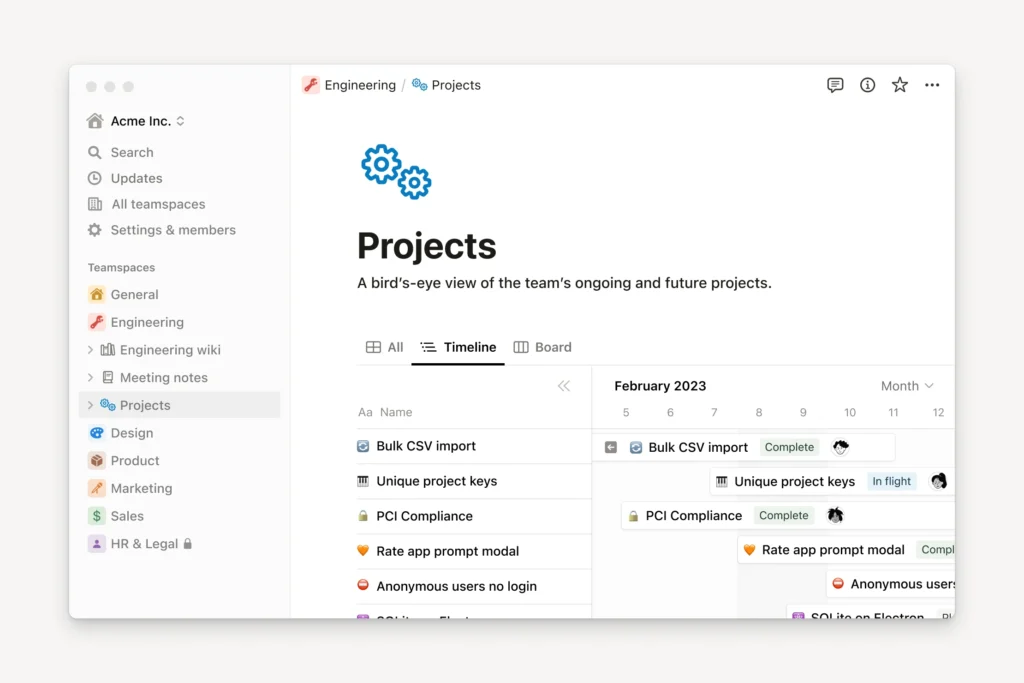
Notion, in contrast, prides itself on its simplicity and flexibility. Its block-based structure allows users to create customized workflows with ease. However, this flexibility can sometimes lead to confusion, as users must decide how to structure their workspace effectively.
“Notion’s beauty lies in its minimalism, but this simplicity can also be a double-edged sword if not used thoughtfully,”
says Marie Poulin, a Notion expert.
Onboarding Experience and Learning Resources
Both ClickUp and Notion offer onboarding experiences and learning resources to help users get started. ClickUp provides interactive tutorials and a comprehensive knowledge base, while Notion offers a guided tour and a community-driven template gallery. The quality and accessibility of these resources significantly impact the learning curve for new users.
Mobile App Performance
The mobile app performance is another critical aspect of the user experience. ClickUp’s mobile app is praised for its robustness and feature parity with the desktop version. Notion’s mobile app, while functional, sometimes lags in terms of responsiveness and feature completeness. For teams on the go, the reliability and performance of the mobile app can be a deciding factor.
Task Management and Project Organization Capabilities
The ability to manage tasks efficiently is crucial for project success, and ClickUp and Notion are two tools that excel in this area. Both platforms offer comprehensive task management and project organization features that cater to diverse project needs.
ClickUp’s Task Management System
ClickUp’s task management system is designed to be highly versatile, allowing users to create, assign, and track tasks with ease. It offers features like task prioritization, due dates, and time tracking, making it a robust tool for managing complex projects.
Key Features: Task hierarchy, custom statuses, and advanced filtering options.
Notion’s Database-Driven Task Approach
Notion takes a more flexible approach with its database-driven task management system. Users can create custom databases for tasks, allowing for a tailored approach to task management that fits the specific needs of their projects.
Key Features: Customizable databases, Kanban boards, and calendar views.
Multiple Views: List, Board, Calendar, and Timeline
Both ClickUp and Notion offer multiple views to help teams visualize their projects. ClickUp provides List, Board, Calendar, and Timeline views, while Notion offers similar flexibility with its database views.
Subtasks, Dependencies, and Advanced Project Structuring
Both tools support subtasks and dependencies, enabling users to break down complex projects into manageable components. ClickUp’s task hierarchy and Notion’s database relations facilitate advanced project structuring.
Here’s a comparison of the task management features:
| Feature | ClickUp | Notion |
|---|---|---|
| Task Hierarchy | Yes | Yes (via database relations) |
| Custom Statuses | Yes | Yes |
| Multiple Views | List, Board, Calendar, Timeline | List, Board, Calendar, Gallery |
| Subtasks and Dependencies | Yes | Yes |
In conclusion, both ClickUp and Notion offer powerful task management and project organization capabilities. The choice between them will depend on the specific needs of the project and the team’s preferences regarding structure and flexibility.
Collaboration Features and Team Communication
As teams become increasingly distributed, the need for seamless collaboration tools has never been more pressing. Both ClickUp and Notion recognize this need and offer a range of features designed to enhance team communication and collaboration.
Real-Time Collaboration Capabilities
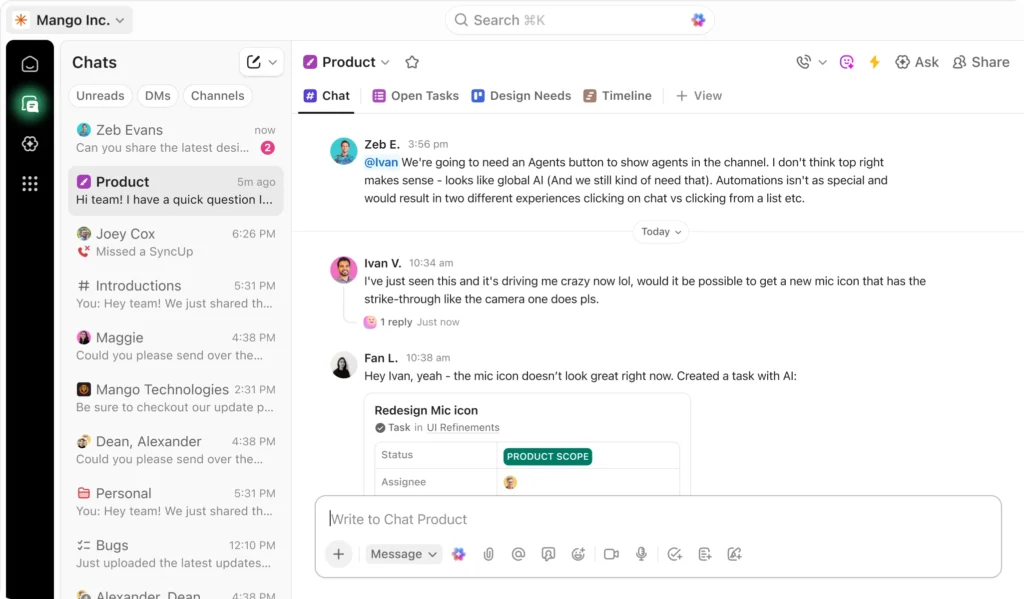
ClickUp and Notion both offer real-time collaboration capabilities, allowing team members to work together simultaneously. ClickUp’s real-time editing feature enables multiple users to edit a document or task simultaneously, while Notion’s real-time collaboration is more focused on its database-driven approach, allowing teams to collaborate on complex projects.
Comments, Mentions, and Team Communication
Effective team communication is crucial, and both tools provide robust commenting and mentioning features. ClickUp allows users to comment on tasks and @mention team members, while Notion offers a similar feature, enabling users to discuss tasks and projects directly within the platform.
Document Collaboration and Knowledge Management
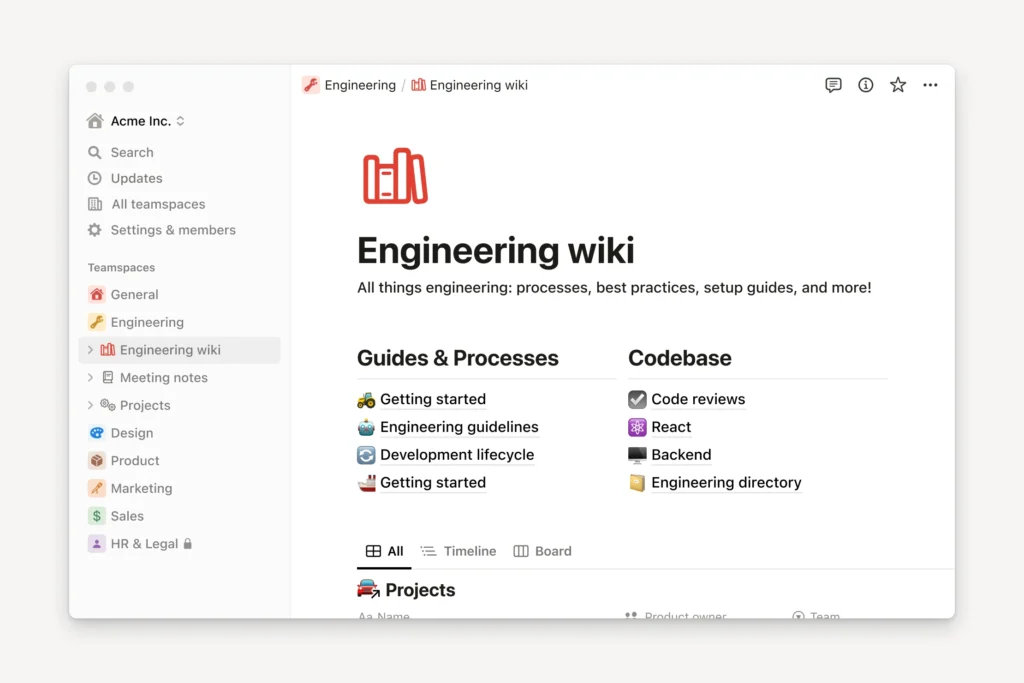
Document collaboration is another key area where both tools excel. Notion, in particular, is known for its all-in-one workspace approach, allowing teams to create, edit, and share documents seamlessly.
Permissions and Access Control
Both ClickUp and Notion offer robust permission settings, allowing administrators to control who can view, edit, or manage content. This is crucial for maintaining data security and ensuring that sensitive information is only accessible to authorized personnel.
| Feature | ClickUp | Notion |
|---|---|---|
| Real-Time Collaboration | Yes | Yes |
| Comments and Mentions | Yes | Yes |
| Document Collaboration | Yes | Yes |
| Permissions and Access Control | Yes | Yes |
Integrations, Automation, and Advanced Features
The true power of project management tools like ClickUp and Notion lies in their ability to integrate with other apps and automate workflows. As teams increasingly rely on multiple software solutions, the capacity for seamless integration and intelligent automation becomes a critical factor in choosing the right tool.
Native Integrations and Automations
ClickUp offers a wide range of native integrations with popular tools such as Google Drive, Slack, and Trello, enhancing its functionality and user experience. Its automation feature allows users to create custom workflows, reducing manual tasks and increasing productivity.
Notion, on the other hand, boasts an extensive integration ecosystem, including connections with Google Drive, Slack, and GitHub. Notion’s API also enables users to create custom integrations, making it a versatile tool for diverse team needs.
Workflow Automation Comparison
Both ClickUp and Notion offer robust workflow automation capabilities. ClickUp’s automation is centered around creating custom tasks and workflows based on specific triggers and actions. Notion’s automation is more focused on database-driven workflows, allowing for complex project management scenarios.
- ClickUp’s automation features include task assignments and status updates.
- Notion’s automation capabilities encompass database updates and page creation.
Reporting and Analytics Capabilities
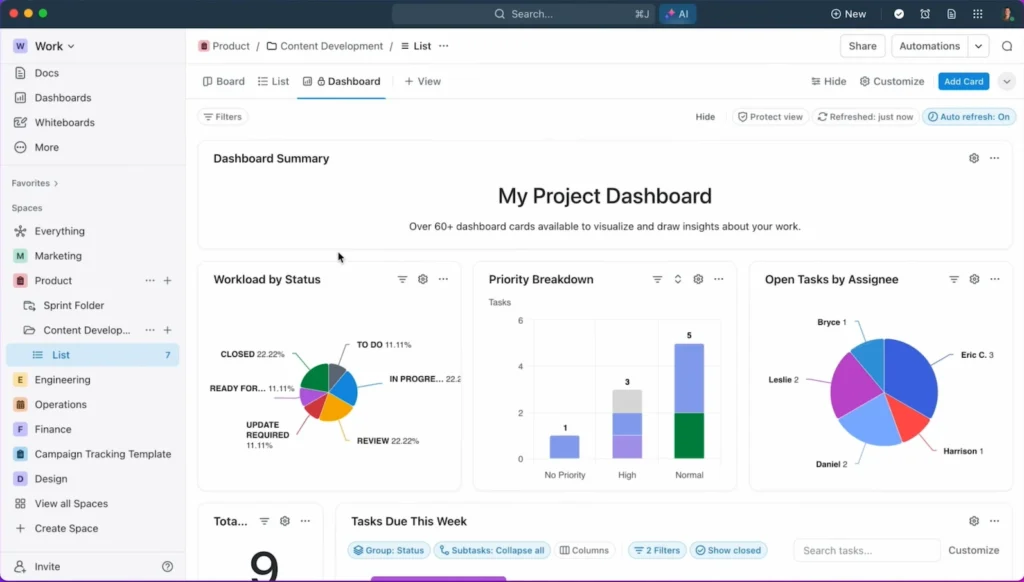
ClickUp provides detailed reporting and analytics, offering insights into task completion rates, time tracking, and team performance. Notion, while more focused on note-taking and database management, still offers basic reporting features that can be customized to suit specific project needs.
When it comes to advanced features and integrations, both ClickUp and Notion demonstrate strong capabilities. The choice between them will depend on the specific needs of your team and the complexity of your projects.
Pricing Comparison: Value for Money in 2026
The pricing models of ClickUp and Notion are key factors in determining which project management tool offers the best value for money in 2026. As businesses continue to evolve, understanding the cost implications of these tools is crucial for making informed decisions.
ClickUp Pricing Plans and Features
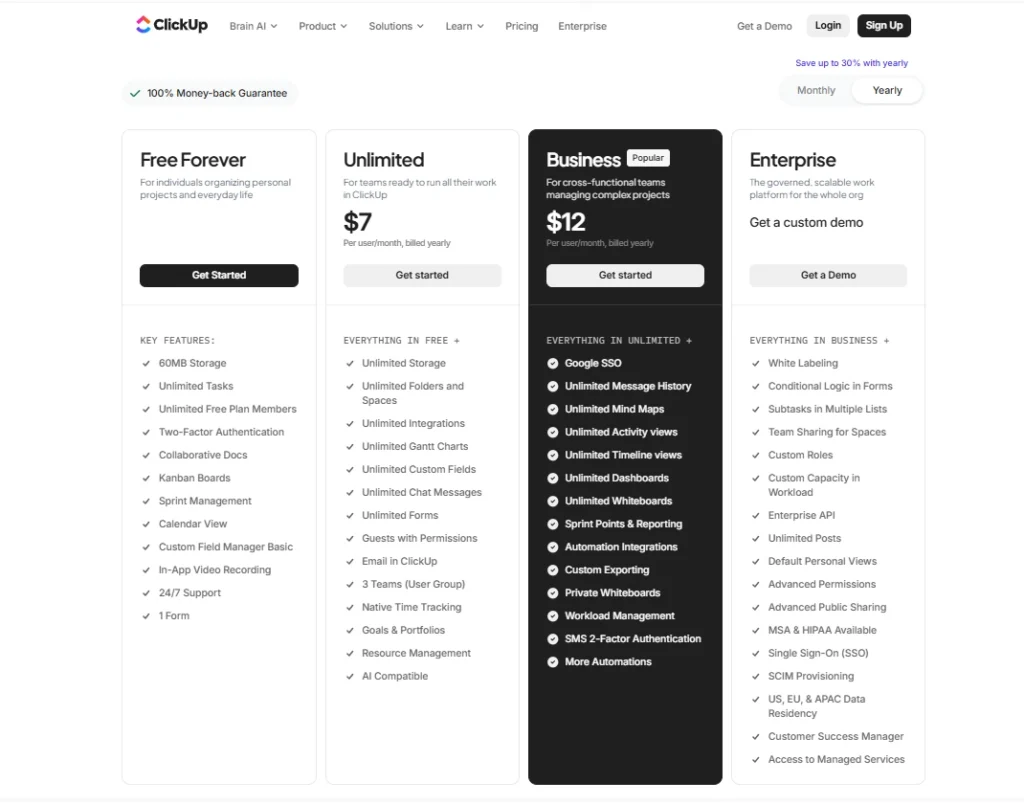
ClickUp offers a tiered pricing structure that caters to various business needs. The plans include:
- Free Forever Plan: Ideal for small teams or individuals, offering basic features.
- Unlimited Plan: Provides advanced features for growing teams.
- Business Plan: Suitable for larger teams requiring more sophisticated project management capabilities.
- Enterprise Plan: Customized for large organizations with complex needs.
Notion Pricing Plans and Features
Notion also offers a range of pricing plans designed to accommodate different user requirements:
- Personal Plan: Free, suitable for individuals.
- Personal Pro Plan: Offers additional features for personal use.
- Team Plan: Designed for collaborative teams.
- Enterprise Plan: Tailored for large organizations with advanced needs.
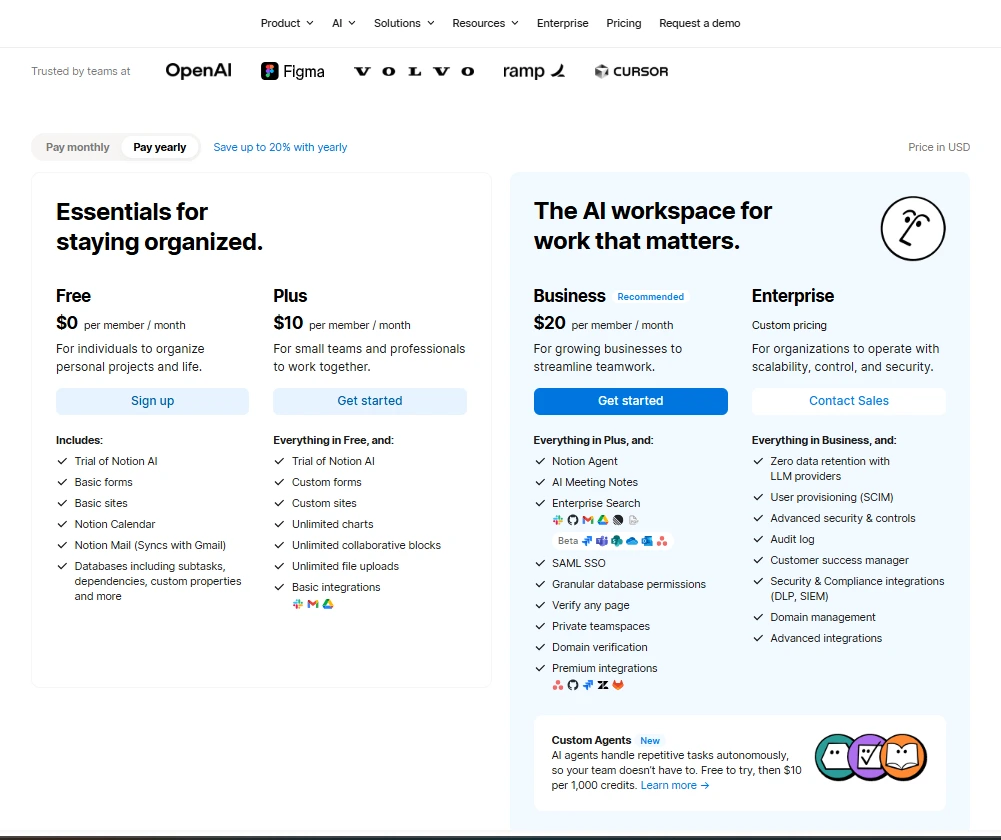
Free Tier Limitations and Paid Plan Benefits
Both ClickUp and Notion offer free tiers with limited features. The paid plans unlock more advanced features, integrations, and support. For instance, ClickUp’s paid plans offer more comprehensive project management capabilities, while Notion’s paid plans enhance collaboration and customization options.
Enterprise-Level Pricing and ROI Analysis
For large enterprises, both tools offer customized pricing. The ROI analysis for these plans depends on the specific needs of the organization, including the number of users, required features, and the level of customization needed.
Use Case Scenarios: Which Tool Fits Your Needs
To determine whether ClickUp or Notion is the better project management tool for your needs, it’s essential to examine various use case scenarios. Different teams and organizations have unique requirements, and what works for one may not work for another.
Best Scenarios for Choosing ClickUp
ClickUp is ideal for teams that require a high degree of customization and flexibility in their project management tool. Its robust feature set, including advanced task management, customizable workflows, and multiple view options (List, Board, Calendar, and Timeline), makes it suitable for complex projects.
Best Scenarios for Choosing Notion
Notion, on the other hand, is perfect for teams and individuals looking for an all-in-one workspace that combines project management with note-taking and database capabilities. Its flexibility and simplicity make it an excellent choice for creative teams and startups.
Small Teams and Startups
For small teams and startups, Notion’s simplicity and free plan can be very appealing. It allows for easy collaboration and is highly adaptable to the changing needs of a growing team. ClickUp also offers a free plan and is scalable, but its feature richness might be overwhelming for very small teams.
Large Enterprises and Complex Projects
Large enterprises with complex projects may find ClickUp more suitable due to its advanced project management features, including Gantt charts, workload management, and detailed reporting. Notion can also handle complex projects, but it might require more setup and customization.
Creative Teams and Content Creators
Creative teams and content creators often benefit from Notion’s flexible and customizable workspace. It allows for the integration of notes, tasks, and databases in a single platform, making it ideal for brainstorming and content planning. ClickUp also offers features beneficial for creative teams, such as customizable workflows and multiple task views.

In conclusion, the choice between ClickUp and Notion should be based on the specific needs and preferences of your team. By examining the use case scenarios, you can make an informed decision that aligns with your project management requirements.
Choosing the Right Project Management Tool in 2026
As we conclude our comprehensive project management tool comparison between ClickUp and Notion, it’s clear that both platforms offer robust solutions for teams and individuals seeking to streamline their workflows.
ClickUp stands out with its extensive feature set, making it an ideal choice for large enterprises and complex projects that require advanced task management and project organization capabilities.
Notion, on the other hand, excels with its flexibility and all-in-one workspace approach, suiting small teams, startups, and creative professionals who value simplicity and customization.
In conclusion, the choice between ClickUp and Notion depends on your specific needs and preferences. By understanding the strengths and weaknesses of each tool, you can make an informed decision that aligns with your project management goals.
Ultimately, both ClickUp and Notion are powerful tools that can significantly enhance productivity and collaboration. Evaluate your requirements carefully to select the best fit for your team.
Final Verdict
If you’re still unsure, check our full reviews of ClickUp and Notion for a deeper analysis.